Lone Worker Safety: Detection Without False Alarms
Who counts as a lone worker, why check-in systems fail at exactly the wrong moment, and how to make no-motion detection reliable enough that people stop switching it off.
8 min read
Safety · Worker Protection
A lone worker is anyone working without direct supervision or nearby colleagues, in a situation where an incident might go unnoticed. The definition matters more than it sounds, because most organisations underestimate how many of these situations they have.
The obvious cases are the ones people plan for: a technician at a remote substation, a driver on a long route, a night-shift security patrol. The unplanned ones are more common and less protected — the maintenance engineer who stayed forty minutes after everyone else to finish a job, the operator who went into a plant room alone because the second person was called away, the warehouse supervisor doing a final walk after the shift left. None of those people were scheduled as lone workers. All of them were.
This guide covers lone worker safety in practice: how to identify situations you are not currently counting, why the two traditional controls fail, and what makes automatic detection dependable enough to survive contact with a real workforce.
The gap
Why the two traditional controls both fail
Most lone worker safety programmes rest on one of two mechanisms, and both share the same structural weakness: they depend on the worker being capable of acting.
Scheduled check-in
The worker calls in every hour. If they miss a call, someone investigates.
The flaw is the interval. An hourly check-in means the worst case is fifty-nine minutes of undetected incapacity, and shortening the interval makes the system so intrusive that people start calling ahead to save trips.
The panic button
The worker presses a device to raise an alarm.
Excellent for the situations it covers — an aggressive visitor, a developing hazard, an injury that leaves you conscious. Useless for the scenarios lone worker programmes exist to address, because a person who has fallen from height or been overcome by gas cannot press anything.
Both belong in a programme. Neither covers the case that keeps safety managers awake, which is the worker who is alone, unable to act, and whose absence will not be noticed until somebody happens to look for them.
Any lone worker control that requires the worker to do something has already assumed the outcome you are trying to protect against.
Passive detection
No-motion detection, and the false alarm problem
The alternative is passive: if a person shows no movement for longer than a defined window, raise an alert without waiting for them to do anything. Conceptually simple, and the reason many deployments fail within a month is entirely about false positives.
A system that alarms every time a technician sits still to read a manual will be muted, ignored or removed. Worse, it trains the response team to assume every alert is nothing — which is precisely the state you do not want them in on the day an alert is real. Three design decisions determine whether that happens.
Design decision
Why it decides whether the system survives
Configurable window
A fixed threshold cannot serve a role that legitimately stands still for twenty minutes and one that never stops moving. The window has to be set per organisation, and ideally per risk group.
Position noise filtering
Satellite and indoor positions drift when nothing is moving. Without a minimum-distance gate outdoors and agreement between consecutive fixes indoors, a stationary badge appears to wander — producing the opposite failure, where genuine stillness is masked by phantom movement.
People only
A parked forklift and an idle machine are stationary all night. If no-motion logic applies to every tracked object rather than only to people, the alert list fills with equipment and nobody reads it.
That third point sounds obvious and is routinely got wrong, usually because detection is implemented as a generic rule over all tracked entities. It is worth asking any vendor directly: does your no-motion alert fire for vehicles?
Knowing who is alone
Detecting the lone working you did not plan
Detection of incapacity solves half the problem. The other half is knowing that someone is alone in the first place, which most programmes handle by schedule — and schedules describe intention rather than reality.
Where presence is known by zone, this becomes a live question rather than a planned one: who is currently the only person in an area flagged as higher risk, and for how long. That produces a list nobody assembled in advance, and it routinely surprises people. The engineer who stayed late, the operator whose colleague was pulled onto another job, the contractor in a plant room at seven in the evening — none of them appear on a lone working schedule, and all of them are working alone right now.
The practical effect is that supervision becomes directed rather than assumed. Instead of a policy stating that lone working requires approval, you have a screen showing who is alone at this moment, which is a considerably more useful basis for a decision. It also works across indoor zones and outdoor geofences on the same rules, so a technician who walks from a plant room to a remote yard does not cross a boundary where the protection changes — see connected worker RTLS.
Response
An alert nobody owns is not a control
Detection is worth nothing without a response path, and this is where otherwise sound lone worker safety programmes quietly fail. The common pattern is an alert delivered to a shared inbox or a group chat, where diffusion of responsibility does the rest: everybody assumes somebody else is handling it.
Three things fix it. Route by rule to a named role rather than a distribution list, so at any moment one person is accountable. Require acknowledgement, so the system knows the difference between delivered and seen. And escalate automatically when acknowledgement does not arrive within a defined period — because the failure mode you are protecting against includes the responder being busy, off shift, or dealing with something else.
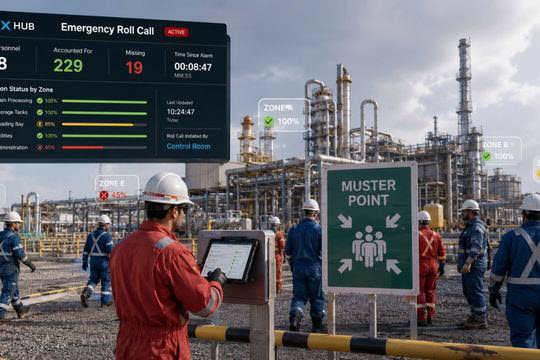
The alert also has to carry location. A message saying that someone has stopped moving is a fraction as useful as one saying which zone they are in, and the difference in a large facility is measured in minutes that matter. Where the alert leads to a genuine emergency, the same location layer supports evacuation accountability, and a worker-initiated alarm is covered by staff duress.
Consent
Get the conversation right before the technology
Lone worker safety monitoring locates people, and that makes it a governance decision before it is a technical one. Deployments that skip this step tend to fail on adoption rather than on technology — devices left in lockers, badges taped inside toolboxes, a programme that reports excellent coverage of equipment nobody is carrying.
Two things make the conversation easier. Be specific about purpose limitation — who can see what, for what reason, and for how long the data is kept — and write it down before enrolment rather than after. And scope visibility using the same role and group permissions as everything else, so a shift lead sees their own area rather than the whole workforce. A system where any manager can watch any employee will be resisted, and reasonably so.
Involving worker representatives early is worth more than any feature. Lone worker safety is one of the few monitoring cases where the benefit to the individual is direct and obvious, which makes it far easier to agree than most — but only if the discussion happens before the system arrives rather than after. Lone working sits inside the wider safety lifecycle, in the protect and detect stages.
How SmartX HUB handles lone working
A live list of anyone alone in a risk-flagged zone or geofence beyond a set number of minutes, so supervision is directed rather than assumed. No-motion detection uses a window configured per organisation, filters position noise so a stationary badge does not appear to drift, and applies to people only — a parked vehicle never triggers it. Alerts route by rule to a named role with acknowledgement tracking and automatic escalation, and carry the zone so responders know where to go. The same rules apply indoors and outdoors, so protection does not change at the door.
Answers to the questions we hear most from teams evaluating RFID tool tracking for maintenance and MRO operations. Have another question? Reach out through our support center.
What are the main challenges of MRO tool control?
Manual tool control drives up cost through shrinkage and audit time, leaves teams with limited real-time data on tool location and status, slows productivity with manual check-in/out, and raises FOD/FME safety risk from misplaced tools. It also makes it hard to prove calibration and maintenance schedules were followed. RFID tool tracking automates tracking and accountability, directly addressing each of these.
How does RFID compare to barcodes, NFC, BLE or GPS for tools?
UHF RFID scans many items at once without line-of-sight, unlike barcodes or QR codes that need manual, direct scans. It offers far longer read range than NFC and avoids the battery upkeep of BLE tags. GPS is best for large equipment over long distances, while UHF RFID is optimized for precise, localized tracking in tool cribs and maintenance areas — ideal for aerospace, manufacturing and construction. See how it fits alongside other options on our RFID technology page.
How do you set up an RFID tool tracking system?
It combines hardware, software and workflows tailored to your operation: fixed readers for continuous or event-triggered inventory and handhelds for inspections; rugged on-metal or embedded tags sized to each tool; software that connects to ERP, MES or calibration systems (with online and offline modes); access control via badge, biometrics or PIN; and automated reporting for usage logs, calibration reminders and audits.
How does RFID integrate with our existing MRO and ERP systems?
RFID tool tracking is designed to work alongside existing IT infrastructure through standard interfaces such as Ethernet, USB and serial ports, keeping it compatible with ERP, MES and calibration systems. It can run in offline mode when connectivity is restricted, and supports data import/export in common formats along with automated reporting — so you gain traceability without disrupting established workflows. It pairs naturally with CMMS maintenance management.
What if some tools are too small or the wrong shape to tag?
Not every tool can take a standard tag. In those cases you can use miniature rugged tags that embed into small tools like sockets, apply alternative identification such as barcoding or manual binding, and use a hybrid setup where smart cabinets and carts combine RFID with non-RFID identification. Increasingly, "connected tools" ship with native RFID built in, reducing the need for retrofits.
How does RFID ensure calibration and maintenance compliance?
The system goes beyond location. Tools can be flagged for scheduled calibration and blocked from use if overdue, borrow/return data helps predict when a tool needs inspection or replacement, and compliance reports can be generated automatically for audits — cutting manual record-keeping errors and helping you meet industry and regulatory standards.
How does RFID support predictive and preventive maintenance?
By tracking tool usage, lifecycle and calibration schedules, RFID surfaces early signs of wear and triggers maintenance alerts before failures occur. Combined with SmartX HUB predictive analytics, it helps plan maintenance proactively and minimize unplanned downtime.
What keeps tools accessible during downtime or power loss?
Reliable systems build in safeguards: battery backup in cabinets and carts for continuous operation during outages, fail-safe mechanical access in emergencies, and service guarantees that keep spare parts and rapid support on hand — so tool tracking and secure access continue even under adverse conditions.
Still have questions about bringing RFID tool tracking to your operation?